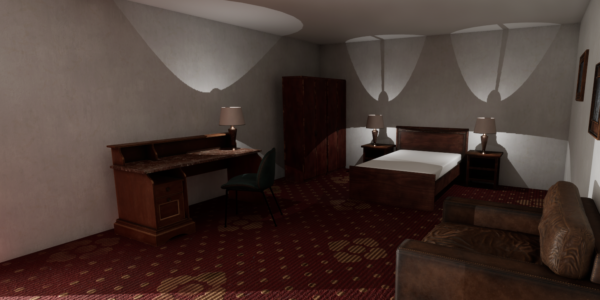
When designing a horror game, the atmosphere is everything. A single room, a flickering light, and a strategically placed shadow can evoke fear and anticipation. In this blog post, I’ll create a basic horror scene in Unreal Engine. I have focused on lighting and interaction. This is a simple setup: a hotel room where a flickering light casts the shadow of a monster on the bathroom wall. It demonstrates an extremely simple approach using a great asset (I’ll put the link at the end)
Step 1: Setting Up The Scene
The first step in building any horror environment is choosing the right setting. For this project, I decided on a hotel room—an ordinary, relatable space that can easily be transformed into something unsettling. I started by creating a small, enclosed room layout in Unreal Engine, including a bedroom and an adjacent bathroom.
Tip: Keep the room design simple (hotels aren’t complicated). I Focused on the essential elements that will support the horror effect, such as a bed, a doorway, and a light in the bathroom which will spill into the room.
Step 2: Lighting the Scene
Lighting is one of the most critical aspects of a horror game. To create a sense of unease, I used a flickering light to project the shadow of a monster onto the wall, visible from the foot of the bed. The aim was to create a glimpse of something sinister, leaving the player unsure if they really saw it.
How to do it: Use a point light to simulate a flickering effect. In Unreal Engine, you can adjust the light’s intensity over time by adding a timeline node in Blueprints, simulating an unpredictable flicker. Experiment with different timing to create the perfect unsettling effect.
Tip: Use subtle, low-key lighting to cast long shadows. Dark corners and dimly lit spaces can create tension, as players will instinctively feel there’s something hiding just out of sight.
Step 3: Casting Shadows
Shadows can play tricks on the mind, especially when they suggest something that isn’t really there. I created a simple silhouette of a monster figure by placing a static mesh behind the light source, so the flickering would cast a distorted shadow on the bathroom wall. The bathroom door opens ominously framing and revealing the monster but you can never see the creature, the door slams shut when you try to approach.
How to do it: Position your light source in the bathroom so that it shines through the open bathroom doorway. Place a basic monster model out of view in front of the light, ensuring its shadow is cast onto the bathroom wall. Use the light’s intensity and angle to stretch and warp the shadow for a more disturbing effect.
Step 4: Adding Interaction
The final touch is making sure the player can interact with the environment in a way that adds to the atmosphere. For this scene, I added a mechanic where the light would flicker and the door would creep open only when the player reaches a certain point in the room, creating a moment of tension.
How to do it: Use Unreal Engine’s trigger volumes to detect when the player enters a specific area, activating the light flicker and door animation. This can be done by setting up an event in Blueprints that controls the light’s behaviour when the player is nearby.
Tip: Play with timing and pacing. The light doesn’t have to flicker right away. A small delay can build anticipation, leaving the player wondering why the room suddenly feels different.
Final Thoughts
Creating a simple horror scene in Unreal Engine doesn’t require complex assets or over-the-top effects. Often, it’s the subtle details… the flicker of a light, a shadow, that make the experience creepy. By focusing on atmosphere and playing with players’ expectations, you can craft a scene that is eerie.
Feel free to experiment with these techniques in your own projects. Horror is all about creating fear, and there’s no better way to do that than by taking something familiar and twisting it into the unknown. It’s also very subjective, what I have done here might not work for you but it works as a starting point, Happy haunting!
Hotel model: https://www.fab.com/listings/01e8bfc9-154e-4d7b-b96e-bb550b7eeb19